Fix GBWhatsApp Login Issues Easily: Complete Step-by-Step Solution Guide
GB WhatsApp is one of the most widely used modified versions of WhatsApp. It is loved by millions of users all over the world for its advanced features, additional privacy options, and unlimited customization options. However, like all other third-party apps, GBWhatsApp also faces some errors. One of the most common errors faced by users is the GB WhatsApp login error.
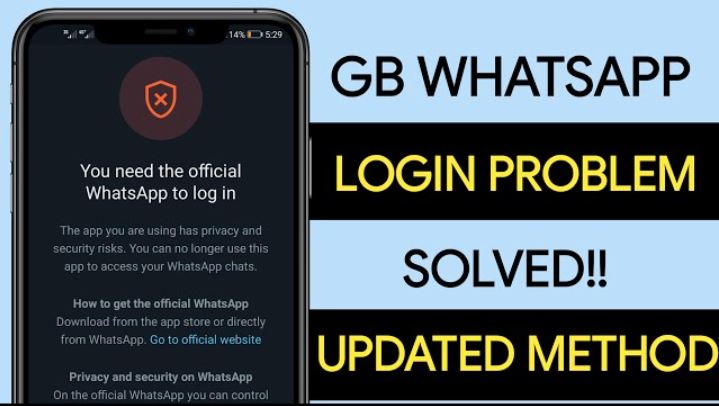
Many users have complained about receiving an error message saying, “You need the official WhatsApp to log in” or experiencing frequent login failures. This can be quite annoying, especially when you are in a hurry to access your messages. The good news is that this error is not a major one. In most cases, it can be resolved by following some simple steps.
In this blog, you will learn the reasons behind the GBWhatsApp login error, the best working solutions, and how to avoid login errors in the future.
Why Does GB WhatsApp Display Login Errors?
GBWhatsApp is not an official app. It is a modified version of the original WhatsApp. This is because it is developed by third-party developers. This results in authentication errors, login warnings, or logouts.
The key factors that cause GBWhatsApp login issues include outdated versions of the app, changes in the security policy of WhatsApp, cache overload, network issues, or restrictions on the device. At times, WhatsApp restricts the use of mod apps to prevent misuse and data breaches.
Knowledge of these factors helps to resolve the issue quickly and safely.
Common GB WhatsApp Login Errors
There are many common errors faced by users while attempting to log in to GB WhatsApp. These include:
- The error message stating “You need the official WhatsApp to log in”.
- Failed OTP verification attempts.
- The login process gets stuck at the verification page.
- QR code linking problems.
- Unintentional logout after successful login.
These errors might seem alarming, but they can be easily resolved.
Best Solutions for GB WhatsApp Login Issues
The following are the best and most effective solutions to resolve your GB WhatsApp login issue safely.
Method 1: Login Using Official WhatsApp First
This is the easiest and most effective solution.
- First, download and install the official WhatsApp app from the Play Store.
- Launch the app and log in using your phone number.
- Complete the OTP verification process.
- Once your login is successful, close the official WhatsApp app.
- Now open the GB WhatsApp and try to log in again using the same phone number.
- In most cases, this will remove the login restriction and enable smooth login.
This is because official login helps to refresh your login session on the WhatsApp server.
Method 2: Use Companion Device Linking Method
This method is particularly helpful when the direct login method does not work.
- First, install the official WhatsApp app on your main phone and log in normally.
- Go to Settings > Linked Devices and keep this screen open.
- Now install the GBWhatsApp on your secondary phone or device.
- Open it and click on the Link a Device option. You will see a QR code.
- Scan the QR code using the official WhatsApp app.
- After linking, the GB WhatsApp will begin to sync your chats.
This method will also remove the direct login restriction and enable smooth login.
Method 3: Update GBWhatsApp to the Latest Version
- Using an outdated version of the GB WhatsApp can cause frequent login restrictions.
- Developers often release updates to remove bugs, enhance security, and remove restrictions.
- It is always important to download the latest version of the GBWhatsApp file from a trusted source.
- Once the update is installed, it is important to restart your phone and then attempt to log in again.
In most cases, the problem of login failure is eliminated after the update.
Method 4: Clear Cache and App Data
In some cases, too much cache file accumulation and damaged data may cause login difficulties.
- To eliminate this problem, go to your phone’s Settings > Apps > GBWhatsApp > Storage.
- Delete cache files and data. Restart your phone and then attempt to log in again.
- This will help to refresh the app files and eliminate damaged temporary data.
Method 5: Check Internet Connection
A slow and unreliable internet connection may cause difficulties in the OTP verification and login processes.
- It is important to ensure that your mobile data or Wi-Fi connection is stable.
- If a login failure occurs, try switching between Wi-Fi and mobile data. Restart your router if necessary.
- A stable internet connection will ensure smooth verification.
Why GB WhatsApp Is Not Working Properly?
Common causes include:
- Outdated GBWhatsApp version
- Incorrect device security permissions
- Low storage space
- Too many background apps
- Corrupt system cache
- Unstable internet
Correcting these problems will enhance performance and minimize login problems.
Is It Safe to Use GBWhatsApp?
GB WhatsApp has numerous advanced features, but it is a third-party application nonetheless. This implies that there is always a slight risk of data leakage or account ban.
To ensure safety, follow these guidelines:
- Use GBWhatsApp on a secondary phone number
- Do not share personal and sensitive information
- Activate the app’s privacy and security settings
- Keep the app updated
- Avoid accessing unknown APK sources
If security is your primary concern, then the official WhatsApp is the safest choice.
Tips to Prevent GBWhatsApp Login Problems in the Future
To prevent experiencing login problems again, follow these best practices:
- Always use the latest version of GB WhatsApp
- Avoid constantly switching between multiple WhatsApp mods
- Clear the cache regularly
- Ensure stable internet connectivity
- Do not connect multiple devices simultaneously
- Back up your chats regularly
By following these simple practices, you can minimize bugs, login errors, and account bans.
Should You Continue Using GB WhatsApp?
GBWhatsApp is an excellent choice for people who love customization, additional privacy options, and advanced messaging functionality. Nevertheless, it is not a good choice for secure communication, business messaging, or private data transfer.
If you are using WhatsApp for personal communication and entertainment purposes, GB WhatsApp is a suitable choice. However, for secure communication, the original WhatsApp is still the best choice.
Conclusion
GBWhatsApp login issues are quite common but can be resolved easily. The most common reasons for login issues are server restrictions, outdated versions, and login conflicts. To resolve the issue, you can use the official login process for WhatsApp, link your device, and stay updated.
Remember, GBWhatsApp is a third-party app. So, use it carefully, stay updated, and do not share any private information. With proper care, you can enjoy the advanced features of GBWhatsApp without login issues.
FAQs
Why does GBWhatsApp display “You need the official WhatsApp to log in”?
This message appears because WhatsApp restricts third-party apps to ensure the privacy of users. This message appears when the login process fails or security checks occur.
How can I resolve GBWhatsApp login issues permanently?
Use the official WhatsApp verification process, update your app regularly, and avoid using outdated APK files.
Can I move chats from GBWhatsApp to the official WhatsApp?
Yes, you can transfer chats by using local backups and manually restoring them.
Why does GBWhatsApp require constant updates?
Developers often roll out updates to overcome new restrictions and bugs.
Is there a ban risk while using GBWhatsApp?
Yes, there is a risk of bans, whether temporary or permanent. Using a secondary number helps.